Locks
Lock pLP, manage active locks, relock or rely on auto-relock.
Lock management is where you actively manage your pLP locks: create new locks, monitor active ones, relock expired positions, and toggle auto-relock.
In the current app, lock management lives inside the Boost & Locks tab (it is no longer a separate top-level tab). The mechanics below are unchanged.
Top stats
Locked pLP
Total pLP currently locked under your address on the active chain.
Average multiplier
Weighted average of the multipliers of your individual locks (1x to 25x depending on lock duration).
Daily PRFI
Your projected daily PRFI emissions, given your current locked pLP, average multiplier, and chef emission rate.
Next unlock
Earliest unlock date among your active locks — the moment you must relock to avoid disqualification.
Locking pLP
Before locking pLP, generate liquidity tokens on Uniswap, PrjX or HyperSwap, or use the Flik into pLP flow.
To manually lock pLP, navigate to the Locks tab. Choose the amount of pLP tokens to lock and the lock duration of one, three, six, or twelve months. Each duration corresponds to a multiplier — a 12-month lock earns 25x platform revenue compared to one month.

Rules
Locked pLP is subject to a mandatory variable lock duration (1 month to 1 year). Early unlocking is not permitted.
If you don't choose a default lock duration, the lock period defaults to 3 months.
Each lock period has a distinct multiplier, ranging from 1x to 25x, contingent on the chosen duration.
Fees generated from locked pLP can be claimed at any time without penalty.
You continue to receive fees throughout the entire lock period.
Platform fees are distributed linearly over a 7-day rolling window.
If you leave your locked pLP in the protocol after the expiration date, disqualification bounty hunters will remove you from the pool and you forfeit the corresponding 7 days of streamed platform fees to the remaining lockers. Activate Auto-Relock to avoid this.
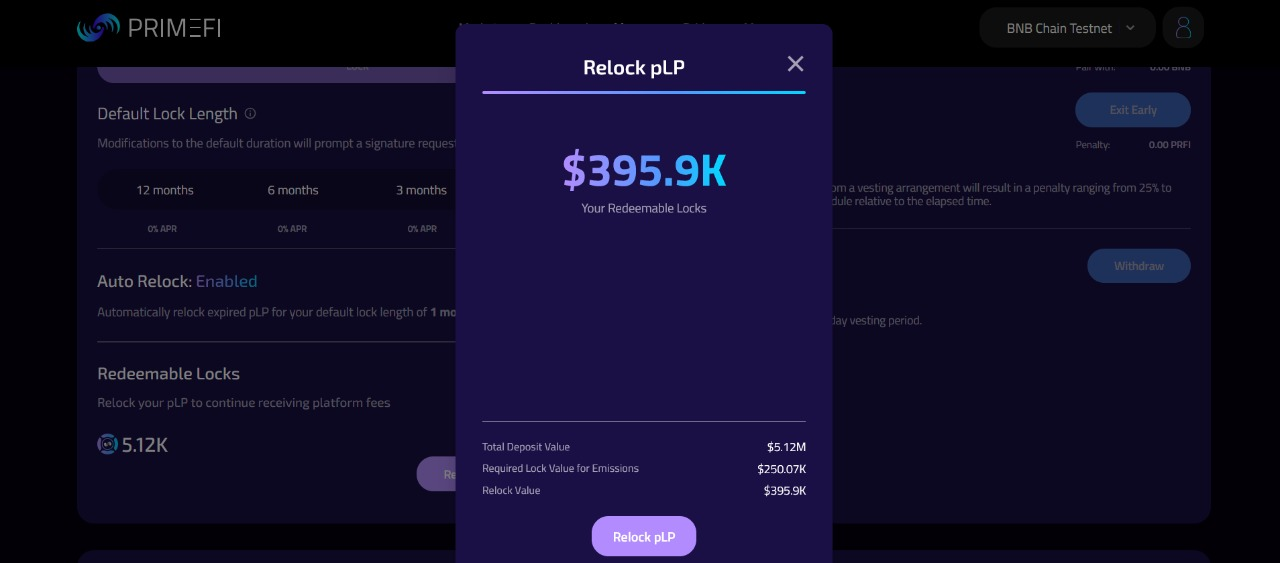
Relock pLP
Banners across the PrimeFi platform indicate when your lock expires. Expired locks stop receiving platform fees and may impact your PRFI emission eligibility in the money market.
From the top banner on the PrimeFi platform, choose "Relock pLP" and confirm the transaction.
The default lock duration is configured to 3 months (4x multiplier) unless you have chosen a different default from the Locks tab.

Select the lock length.

Click "Relock".

Review the transaction details, click "Relock pLP", and confirm in your wallet.

Auto-relock
To prevent the loss of platform fees and maintain eligibility for PRFI emissions, use the Auto-Relock feature on the Locks tab.
To activate auto-relock, toggle the switch to the right and confirm the transaction in your wallet.
To deactivate auto-relock, toggle the switch to the left and confirm the transaction in your wallet.

Auto-relocks lock all expired pLP automatically for your default lock duration.
Lock calendar
The Locks tab also surfaces a calendar view of every active lock, so you can see at a glance when each lock matures. Use it to plan claim/relock windows for several locks created at different times.
Statistics for pLP
The Locks tab also exposes the per-user stats panel:
Your Locked pLP — variable value of pLP influenced by volatility of the underlying tokens (PRFI & HYPE / PRFI & ETH).
pLP USD Value = (TWAP(PRFI, 1 hr) × prfiInLp) + (hypePrice × hypeInLp) / LP Supply
pLP Locked (global) — cumulative value of all pLP locked on the chosen chain.
Daily platform fees (global) — total daily platform fees, influenced by borrowing interest, liquidations and flash loan fees generated by the protocol over a rolling 24-hour period. Distributed linearly over 7 days.
Your share — percentage of global daily platform fees that belongs to you, determined by your locked pLP weighted by your average multiplier divided by the global locked pLP weighted by the global average multiplier.
Calculation:
(User pLP × User Avg Multiplier) / (Total Protocol pLP × Global Avg Multiplier)Total Annual Platform Fees — projected protocol fees over 365 days, extrapolated from the rolling 24-hour sample.
Calculation:
User Daily Protocol Fees × 365Your Present Lock APR — user-specific Lock APR derived from your average multiplier.
Calculation:
Global 1-month Locking APR × User Avg Multiplier
Last updated